
WordPress spam protection
Stop spam before it reaches your inbox
Maspik combines many independent protection layers into one detection engine — so you block more spam with fewer false positives. No CAPTCHA. No puzzles. No interruption for real visitors.
Install. Activate. You’re protected.
- 200M+ Spam messages blocked
- 19+ Form builders supported
- 0 CAPTCHAs your visitors solve
- 14-day Money-back guarantee
Why site owners choose Maspik
Works immediately
No API keys, no CAPTCHA setup, no complicated configuration. Activate it and your forms are protected. Advanced users can then tune every layer individually.
Local-first, so it stays fast
Most detection runs inside WordPress without contacting anything external. Only the layers you enable ever execute, and there is no front-end JavaScript slowing your pages down.
Privacy by design
Cloud protection is optional, and only the data a check needs is transmitted. No visitor tracking, GDPR friendly, and the cloud layer runs under its own Data Processing Agreement.
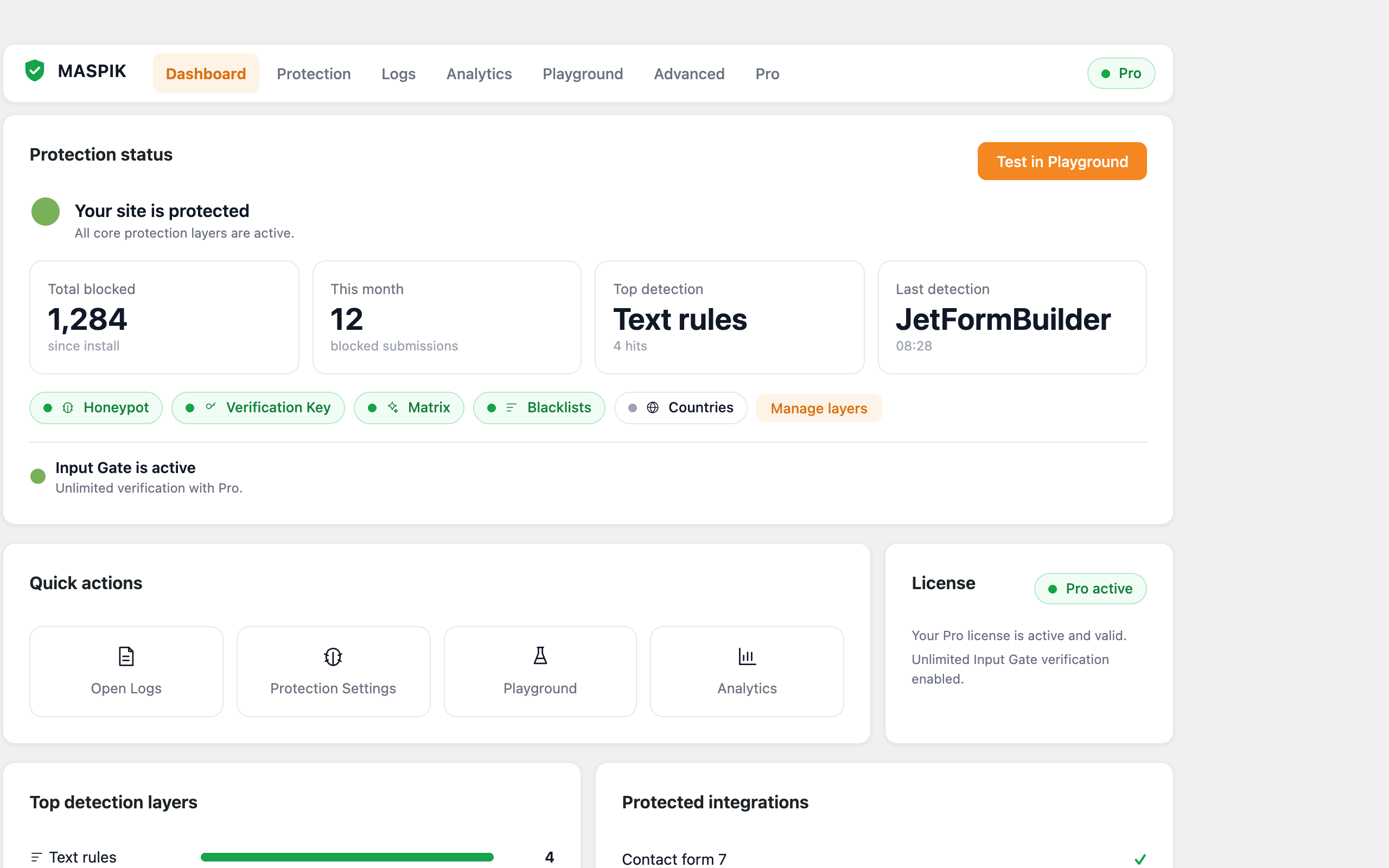
Everything in one dashboard
See what is being blocked, which layers are doing the work, and how your protection is trending — without leaving wp-admin.
One engine, many layers
Most anti-spam plugins rely on a single technique — a CAPTCHA, a keyword filter, or one external API. Maspik runs as many independent layers as you enable, together. That is what produces stronger blocking with fewer false positives.
Content rules
- Forbidden keywords
- Email patterns
- URL validation
- Phone format validation
- Character limits
- Link limits
- Emoji filtering
Bot traps
- Honeypot protection
- Verification key
- Direct POST protection
Reputation & origin
- IP blocklists
- IP reputation
- Proxy and VPN detection
- Country and continent restrictions Pro
- Language rules Pro
Cloud intelligence
- InputGate — AI analysis
- Pattern & heuristic detection
- Threat intelligence
Enable only what you need — every layer is optional and configurable.
It already works with your forms
WordPress core forms and comments, plus the form builders you are most likely already using. Nothing to wire up.
- Elementor Forms
- Elementor Atomic Forms
- Contact Form 7
- Fluent Forms
- Formidable Forms
- Forminator
- Ninja Forms
- JetFormBuilder
- Everest Forms
- Breakdance Forms
- Bricks Builder
- Divi Contact Form
- Hello Plus
- MetForm
- Bit Form
- BuddyPress Registration
- WordPress Comments
- WordPress Registration
- Custom PHP forms
With Pro, also:
- WPForms
- Gravity Forms
- WooCommerce Registration
- WooCommerce Checkout
Built your own form in PHP? A two-line developer API covers it — see the docs.
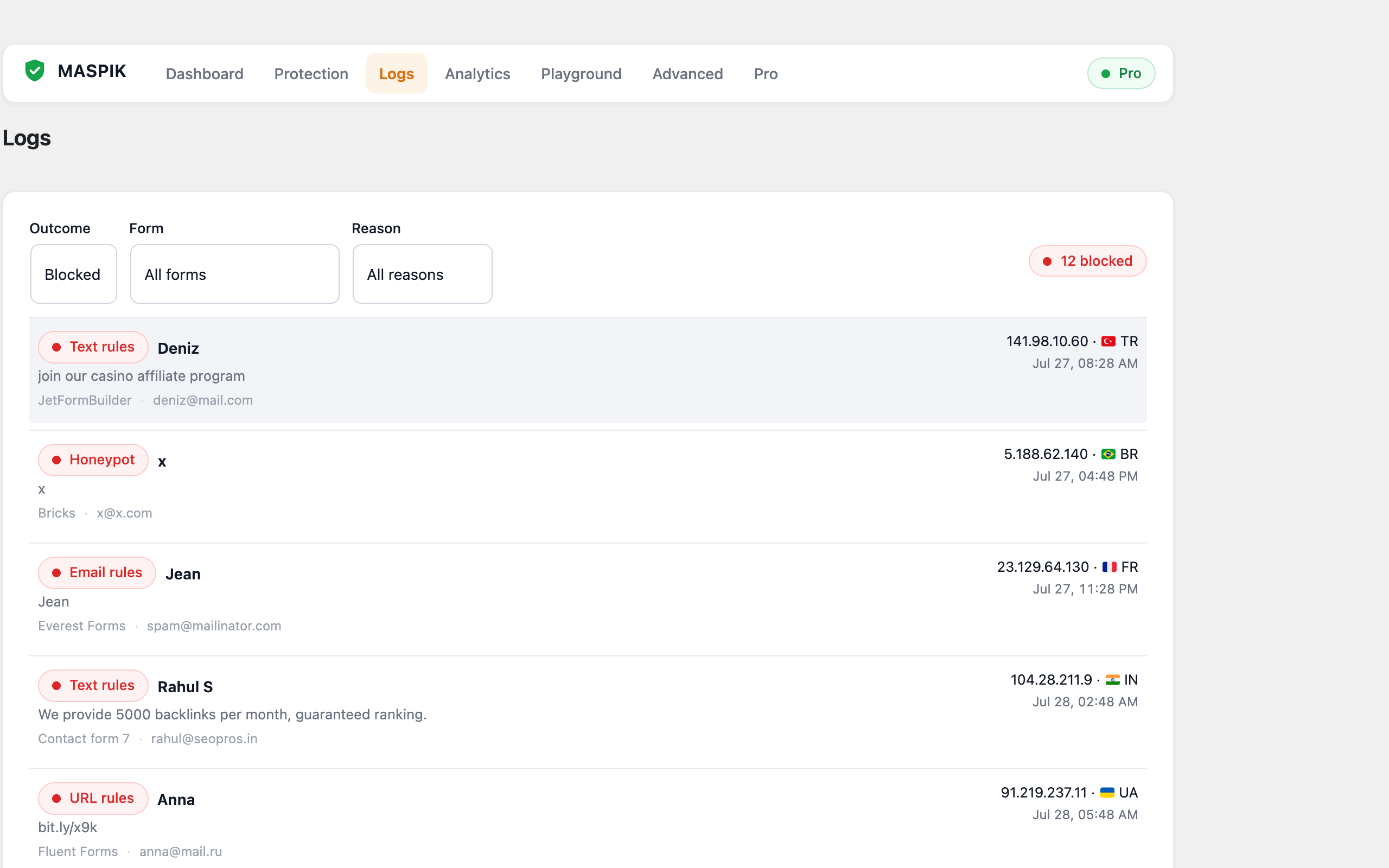
Know exactly why something was blocked
Every anti-spam plugin claims it works. Maspik shows you. The submission log records the full detection trace, so a false positive takes seconds to understand instead of an afternoon.
- Why it was blocked, and which layer caught it
- A full detection trace of every layer that ran
- The submitted values, IP address and country
- Date, time and the page the form was on
- One click to turn a blocked value into a rule
- Mark anything as “Not Spam” to tune your setup
Why go PRO?
The free version covers basic spam protection. Maspik PRO unlocks the features you need when you want maximum protection — and when managing one site by hand stops being realistic.
| Feature | Free | Pro |
|---|---|---|
| InputGate cloud protection | 100 / month | Unlimited |
| Country and continent restrictions Pro only | — | |
| Language rules Pro only | — | |
| WPForms & Gravity Forms Pro only | — | |
| WooCommerce registration & checkout Pro only | — | |
| Central dashboard for multiple websites Pro only | — | |
| Premium support Pro only | — | |
| All local protection layers | ||
| Honeypot & verification key | ||
| IP blocklists & reputation | ||
| Proxy and VPN detection | ||
| Submission log with full detection trace | ||
| Statistics & detection trends | ||
| 19+ form builders & WordPress core | ||
| AbuseIPDB & ProxyCheck integrations | ||
| Import / export your configuration | ||
| Custom PHP form API |
InputGate
The optional cloud layer: IP reputation, pattern and structural analysis, AI scoring and threat intelligence. Free includes 100 checks a month — Pro is unlimited. Your local rules keep working either way.
Country & Language rules
Block submissions by country, continent or language, so your forms only accept the audience you actually sell to.
Central Dashboard
Manage rules, blocklists and logs for every site you own from one screen — instead of logging into each wp-admin one by one.
Choose your plan
One licence covers every form on your site. Pick the number of websites you need — the more you protect, the less each one costs.
14-day money-back guarantee on every plan — no risk
1 Website
For a single site you own
$ 19 / year
$19.00 per siteGet 1 Website $19 / year
Instant licence key • Cancel anytime
10 Websites
For freelancers & small agencies
$ 59 / year
$5.90 per site
$190
save 69%
Instant licence key • Cancel anytime
100 Websites
For growing agencies & maintenance plans
$ 129 / year
$1.29 per site
$1,900
save 93%
Instant licence key • Cancel anytime
1000 Websites
For hosts & large networks
$ 299 / year
$0.30 per site
$19,000
save 98%
Instant licence key • Cancel anytime
Billed yearly · Renews automatically at the same price · Cancel any time from My Account
What our users say
Reviews from the WordPress.org plugin directory.
Maspik blocked over 99% of our form spam within days, it’s a lifesaver!
I’ve been using the free version of this plugin for over a year and it is brilliant. I find it very easy to control what I want to block, and it has blocked masses of spam. I’ve now made the decision to pay to get the Pro version.
Thank you so much for this plugin! Its better than anything else. Blocked all the spam coming to my forms without complexity and useless bloat.
I have tested this and paid for membership, it works great so far and highly needed in this community. The private API is amazing. Great job.
It is definitely worth the small payment, and it works very well. I have been using it for several months and I love it and my clients love having less spam.
Frequently Asked Questions
Everything people ask us before upgrading.
Do my visitors have to solve a CAPTCHA?
Will it slow my site down?
What if spam still gets through?
How do I activate Maspik Pro?
Does my licence renew automatically?
What happens when my Pro licence expires?
Can I upgrade my plan to include more sites?
Does a staging or development site use up a licence slot?
What is the Central Dashboard?
What is your refund policy?
Is Maspik GDPR compliant?
The optional cloud layer, InputGate, is powered by InputGate and transmits only the data a check requires. InputGate acts as a data processor on your behalf and operates under its own Data Processing Agreement. Read the InputGate DPA.
Talk to us
Stuck on a rule, or still getting spam through? Send us the details and we will help you configure Maspik until it stops.
- We answer every message, usually within a few hours
- Share a spam sample and we will build the rule with you
- Pro customers get priority support
Prefer something else? WhatsApp Documentation